
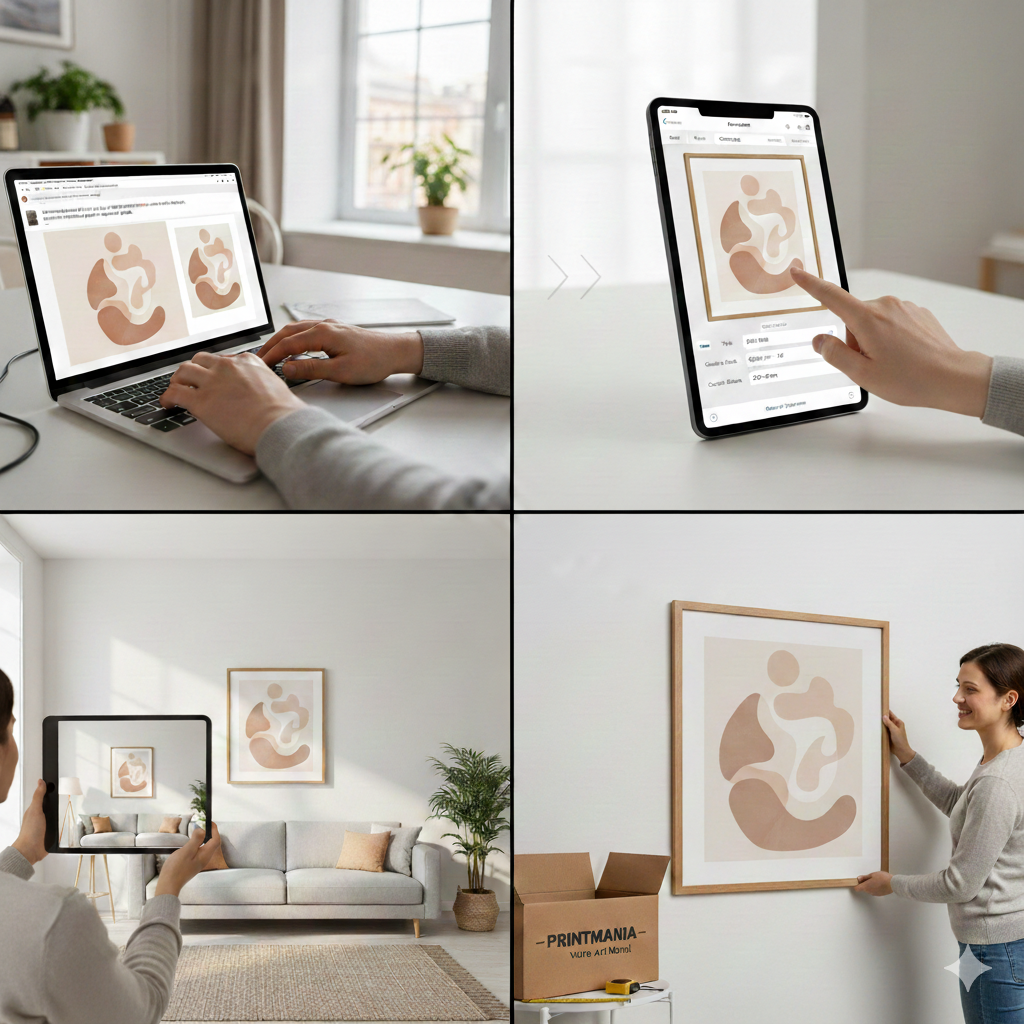
From AI prompt to framed print, the full journey looks like this: create or upload your image, pick the right size and frame, preview it live on a wall, then order a ready-to-hang piece delivered to your door in a few days across Europe.
Why Your AI Art Deserves a Spot on the Wall
Most people let their favorite AI images die in a folder or stay buried in a Discord stream, even though they're often more personal and original than mass-produced posters. When you print them, they stop being "just another screen image" and become a real object that changes how a room feels.
Unlike generic store prints, AI art you've helped design already reflects your taste: the colors you love, the mood you want at home, and the little details that make it feel "very you." Turned into wall art on premium paper, canvas, or in a frame, that personal touch feels closer to a commissioned artwork than to a cheap poster rack find.
There is also a psychological shift when something moves from screen to wall: it becomes part of your daily environment instead of a passing scroll. You see it when you wake up, when you have your coffee, and when guests visit — it becomes a conversation starter instead of a forgotten file. That's the core of the "screen to wall" idea: using AI not just to play with images, but to shape your living space with art you actually live with.
From Idea to Ready-to-Hang: Step by Step
The good news is that you don't need Photoshop skills, a pro printer, or a framing shop around the corner to turn your AI images into finished wall art. Here's the concrete path from concept to the package arriving at your door.
1. Generate or Upload Your Image
You can start right away: create it directly inside a dedicated wall art tool like Printmania, which lets you generate the wall art image you're imagining and build the print from there. Once the file is ready, it becomes the base for your print.
2. Choose Format and Size
Next, you decide the physical format: poster, framed print, canvas, or other options like magnets for smaller spaces. Posters and framed prints work very well in living rooms and bedrooms; canvases add more texture and can feel a bit more "gallery style."
A few quick rules of thumb for size:
- Above a sofa: typically 60–90 cm wide for a single piece, or a set of two/three smaller prints.
- Above a bed: 50–70 cm wide for one centered piece, or a horizontal format that's about 60–80% of the bed width.
- Small walls, desks, or kids' corners: 21×30 cm (A4) or 30×40 cm prints are often perfect.
In a tool built for wall art, you can pick these sizes from a clear list instead of guessing printable dimensions yourself. This removes all the stress around DPI and print files that usually stops people from going further.
3. Select the Frame and Finishes
Once the size is set, you choose how the piece will look as an object: framed with a border, full bleed, with or without mat, and which frame color you want.
Common, versatile frame choices:
- White frame: light, airy, ideal for Scandinavian, minimalist, or coastal interiors.
- Black frame: graphic, modern, great for monochrome art and strong contrast.
- Wood frame: warm, cozy, perfect for living rooms and natural or earthy palettes.
In a specialized app, you pick these options in a few clicks and instantly see how they change the feel of the image. This is much easier than buying a frame separately and hoping it fits both the print and your decor.
4. Preview It Live on a Wall
This is where the experience becomes much closer to interior design than to "just printing a picture." With Printmania, for example, you can preview your poster, canvas, or framed print on a wall in real time, adjusting placement and scale until it feels right.
This live preview helps you:
- See how big the art will look compared to furniture and other items.
- Test different frame colors on a wall before committing.
- Avoid the classic disappointment of "it looked bigger on my screen."
Instead of guessing, you drag, resize, and choose until the art and frame look like they truly belong in a real room. That removes a lot of the uncertainty that usually makes people hesitate.
5. Confirm, Order, and Wait a Few Days
When you're happy with the preview, you simply confirm the order: the app turns your digital image into a print job, adds your chosen frame, and prepares everything for shipping to your address. Because the process is integrated (generation → product customization → preview → order), you don't have to juggle separate printers, framers, and mockup tools.
Printmania prints on premium materials, frames your piece, and ships it across Europe, with typical delivery in about 3–7 days depending on the country. You receive a finished, ready-to-hang artwork: you take it out of the box, hang it on the wall, and your AI idea is now part of your home.
Style Tips for Real Rooms
If you're the one making most of the home decor decisions, the challenge isn't "can AI make something cool?" — it's "will this actually work in my living room?" Here are practical, room-by-room guidelines.
Living Room: Calm, Cohesive, and Grown-Up
The living room is where you welcome guests and spend a lot of time, so the art should feel intentional and not overly "techy" or experimental.
Good directions for AI prompts and image choices:
- Minimal abstract shapes with soft edges, not overly busy.
- Natural elements (misty landscapes, botanical forms, seaside views).
- Limited, coordinated palette (2–3 main colors that echo your cushions, rug, or wood tones).
Try using a prompt pattern similar to what interior-focused guides suggest: "minimalist abstract wall art, limited palette of beige, warm white, and muted terracotta, soft lighting, balanced composition, negative space, premium wall art, print ready." Then, in the app, match the frame to your furniture: wood for warm, cozy rooms, black or white frames for modern, neutral spaces.
Bedroom: Soothing and Personal
In bedrooms, art should help you relax, not overstimulate you. This is the perfect place for AI images that feel intimate or dreamlike.
Ideas that work well:
- Soft, blurred landscapes, clouds, or abstract gradients.
- Gentle line art, silhouettes, or botanical sketches.
- Color palettes with soft blues, greys, blush tones, or warm neutrals.
Avoid very high contrast, neon, or extremely detailed pieces above the bed; they can feel busy or harsh in the evening. A framed print with a white or light wood frame usually looks softer and more "hotel-like" than a very dark one.
If you have AI portraits of you and your partner or family, consider a small series instead of one very large piece: two or three images in harmony can feel more story-driven and personal.
Kids' Rooms: Playful, Safe, and Future-Proof
Kids' rooms are ideal for AI art because you can create exactly the characters, animals, or worlds your child loves right now. Think friendly, bright, and slightly simplified, rather than ultra-realistic.
Prompt and style ideas:
- Cute animals doing gentle activities (reading, playing instruments, floating in balloons).
- Soft pastels or cheerful but not aggressive colors (mint, peach, light yellow, light blue).
- Themes that can grow with them: space, nature, imaginary cities, or dreamlike landscapes.
Use frames that are light (white or natural wood) and sizes that can be moved or grouped as they grow. Smaller prints allow you to update or replace them as your child's tastes change, without having to rethink the entire room.
How This Journey Matches What Your Tool Solves
Many AI tools stop at the image: they help you generate something, but leave you alone when it comes to printing, framing, and visualizing the result on a wall. That's exactly the gap a product like Printmania fills.
In one flow, users can:
- Generate the wall art image they have in mind with AI, directly in the app.
- Choose the print format, size, and frame, without needing to know anything about DPI or file preparation.
- Preview the final piece on a wall live, adjusting layout until it feels perfect.
- Order a finished print that arrives framed or ready to hang, shipped within a few days across Europe.
This "create it → frame it → preview it → order it" path makes sense for people already comfortable playing with AI images but unsure how to make them real objects for their home. By showing this journey in your article, you help them see that the last missing step — from screen to wall — is now simple and risk-free.

